
Free to start · Link Cursor or Claude in about a minute
Build your WordPress site with AI — then you decide
Ask your AI to build a page. See it in WordPress. Tell it what to change. When it looks right, hit Accept. You and the AI work on the same page — nothing goes live until you say so.
Connect once
Works with the AI you already use
Link Cursor, Claude, or any of these apps in about a minute — then build on the real site. You review every change and Accept when it looks right.
Supported apps
Cursor, Claude, and more
Cursor
IDE
AI code editor
Claude
Desktop & Code
Anthropic
Antigravity
IDE
Google AI IDE
Devin
Windsurf
AI IDE
Cline
VS Code
VS Code extension
Trae
IDE
ByteDance
Codex
OpenAI
Coding agent
Qwen Code
Kimi Code
Also supported
01
Install
From WordPress.org
02
Connect
Link your AI app
03
Accept
Review, then go live
Setup
Watch how it connects
Made for AI and for you
Connect your AI, let it build, change what you want, and Accept when you are happy. Everything you need to finish a real site — without drowning in feature lists.
Connect your AI
Link Cursor, Claude, and other AI apps to your WordPress site in a few clicks. Your AI can then build pages on the real site — not in a separate chat box.
You approve every change
See a preview first. Ask for tweaks in plain language. Hit Accept when it looks good. Nothing publishes until you say yes.
You can still edit by hand
After the AI builds, open any block and tweak it yourself in the normal WordPress editor. AI and you share the same page.
Global Class Manager
Save a style once and reuse it everywhere. Change it later and every place that uses it updates together — cleaner and faster pages.
Motion & interactions
Add simple animations and click actions from the editor. Your AI can set them up too — you can always fine-tune by hand.
Clean, fast pages
Built on normal WordPress blocks — no heavy page-builder junk. Pages stay light and easy to edit later.
Forms
Contact & lead forms
Finish real sites with contact, quote, and signup forms. Your AI can place the form; you can edit fields anytime.
Forms
Entries stay in WordPress
Submissions land in your dashboard. Export CSV, send email, or push to a webhook — you stay in control.
Forms
Spam protection included
Honeypot is on by default. Turn on reCAPTCHA when you need it. Real leads, less junk.
Dynamicity
Visual Query Builder
Show blog posts, products, or any content in a grid or list — without writing code. Great when AI needs to finish a dynamic site.
Dynamicity
Pull in live content
Connect headings, images, and text to real WordPress data (titles, custom fields, and more). AI or you can set it up.
Dynamicity
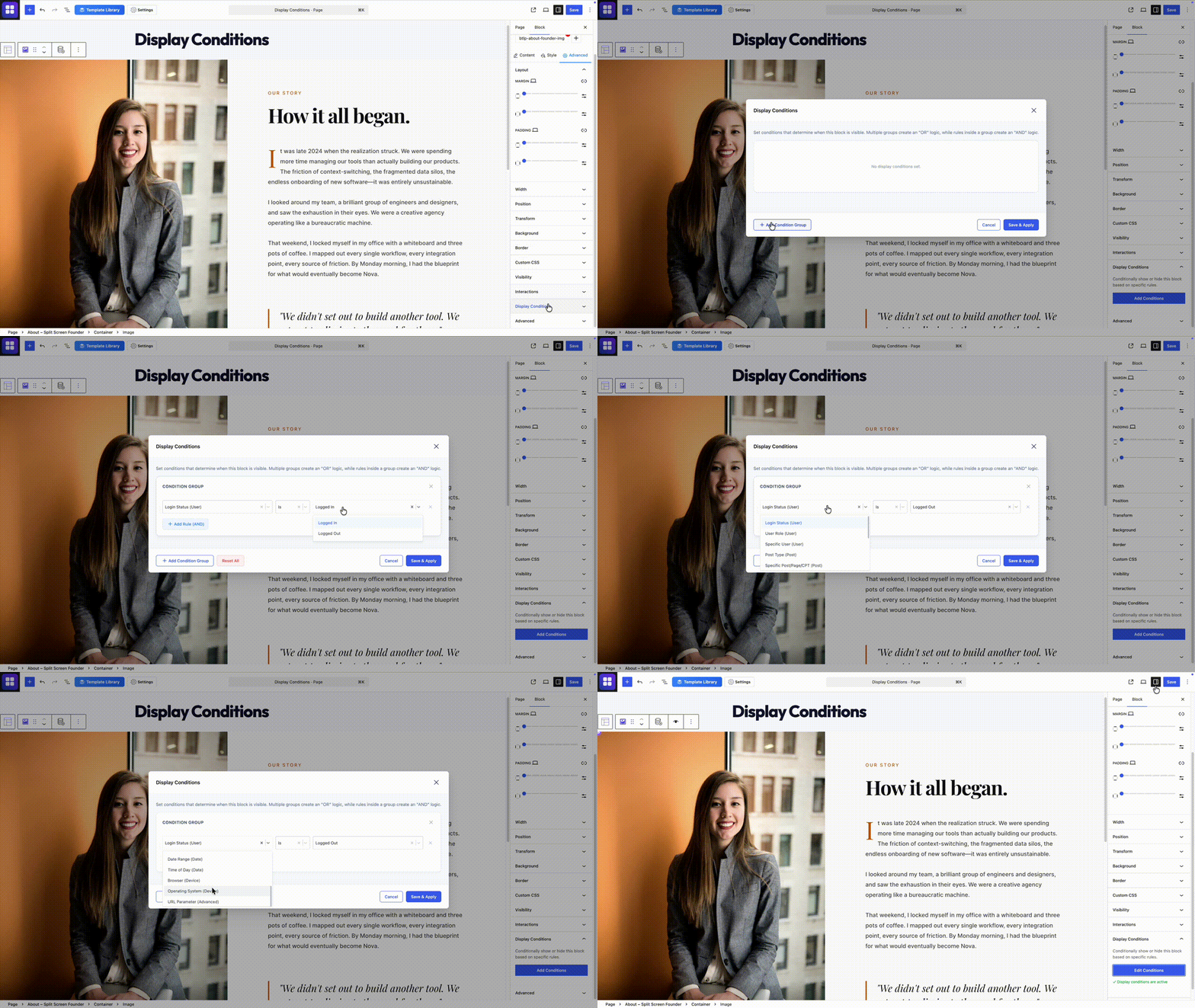
Show or hide by rules
Show a block only to logged-in users, on certain dates, or for specific pages. Set by AI or by you — easy to change later.
Everything you need to finish a site
39 building pieces — Core free, plus Pro Addons for forms and dynamic content. Your AI can place them; you can always edit by hand.
Container
Heading
Paragraph
Image
Button
Dynamicity
Query Builder
Dynamicity
Loop
Forms
Form
Carousel
Before / After
Navigation
Accordion
Tab
Video
Icon
Icon List
Dynamicity
Pagination
Forms
Text Field
Forms
Email Field
Forms
Number Field
Forms
Textarea
Forms
Consent
Forms
Submit
Counter
Progress Bar
Rating
Social Icons
Google Map
Site Logo
Site Title
Site Tagline
Post Title
Post Excerpt
Featured Image
Post Content
Post Info
Query Title
Archive Description
Query Total
Extras when you need a full site
Class Manager is free in Core. Pro Addons unlock forms, dynamic lists, live content, and show/hide rules when you need a fuller site.
Included free
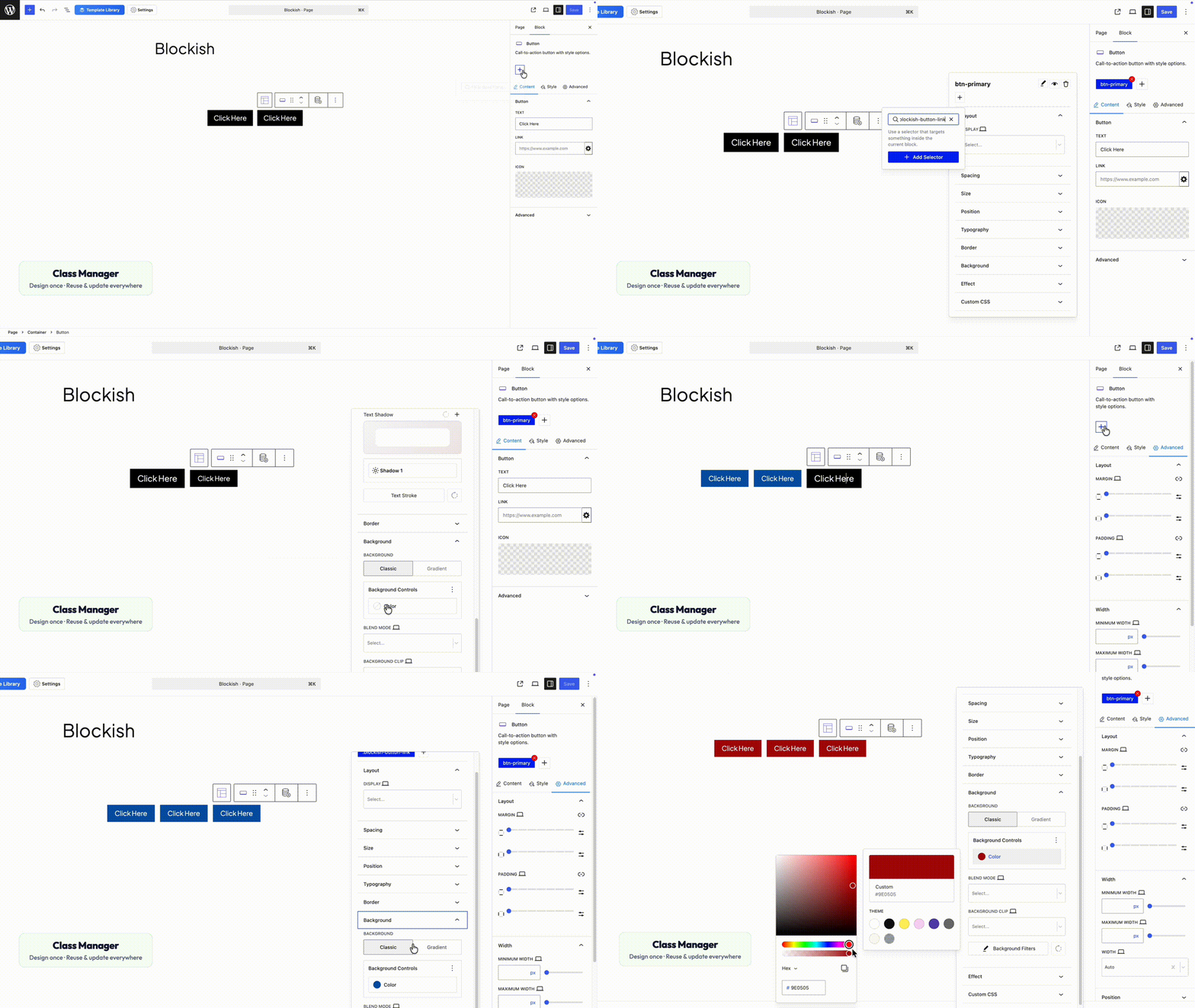
Global Class Manager
Save a look once — colors, spacing, fonts — and reuse it on any block. You or the AI can apply it.
Change the class later and every place that uses it updates together. Cleaner pages, less repeat work.
Save styles once, reuse everywhereUpdate once, stay consistentLighter, faster pages
Dynamicity
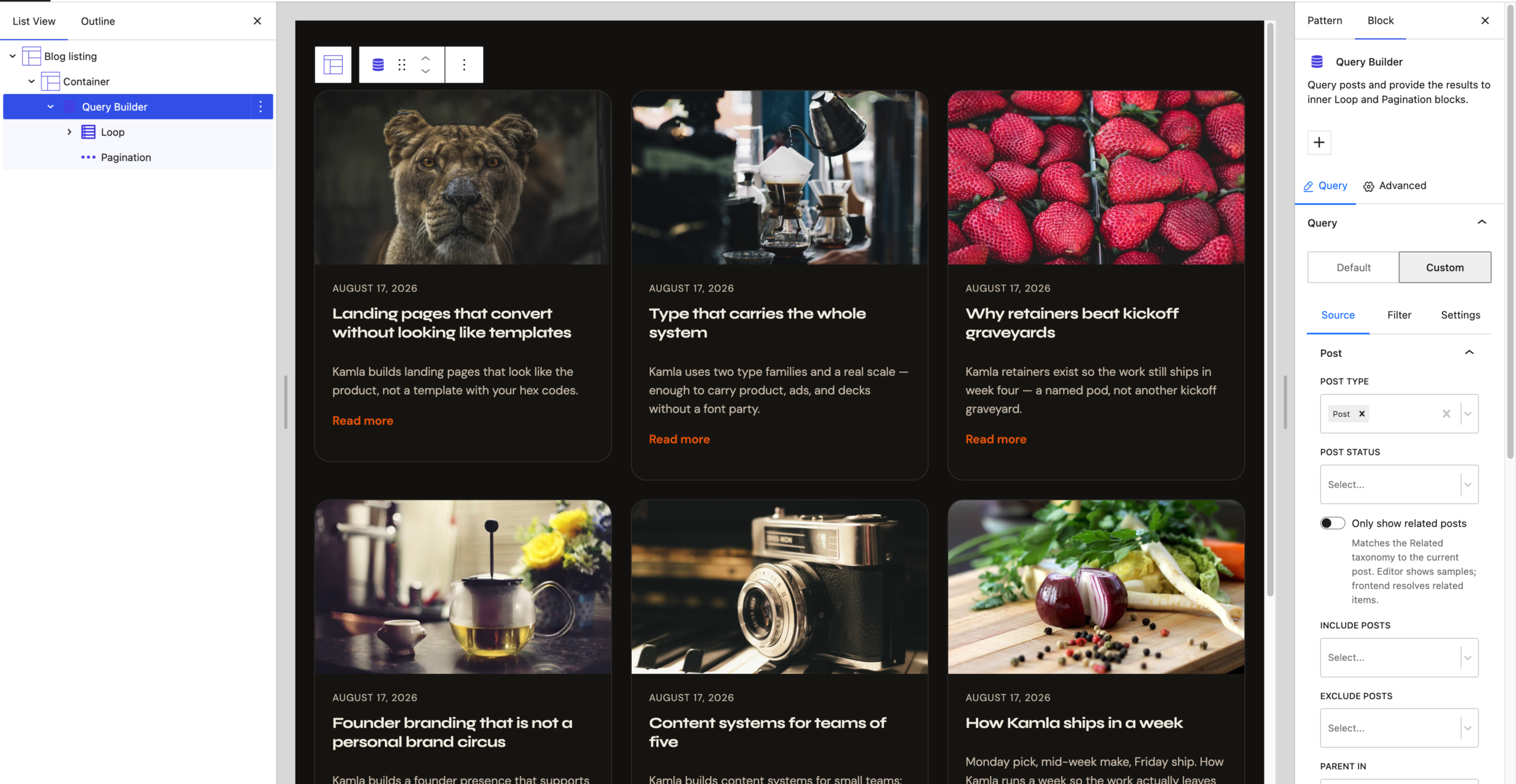
Visual Query Builder
Need a blog grid or product list? Build it visually — no code. Your AI can set this up when finishing a bigger site.
Filter, sort, and add “next page” controls, then drop the list into any layout.
Build lists without codePosts, products, and morePagination included
Forms
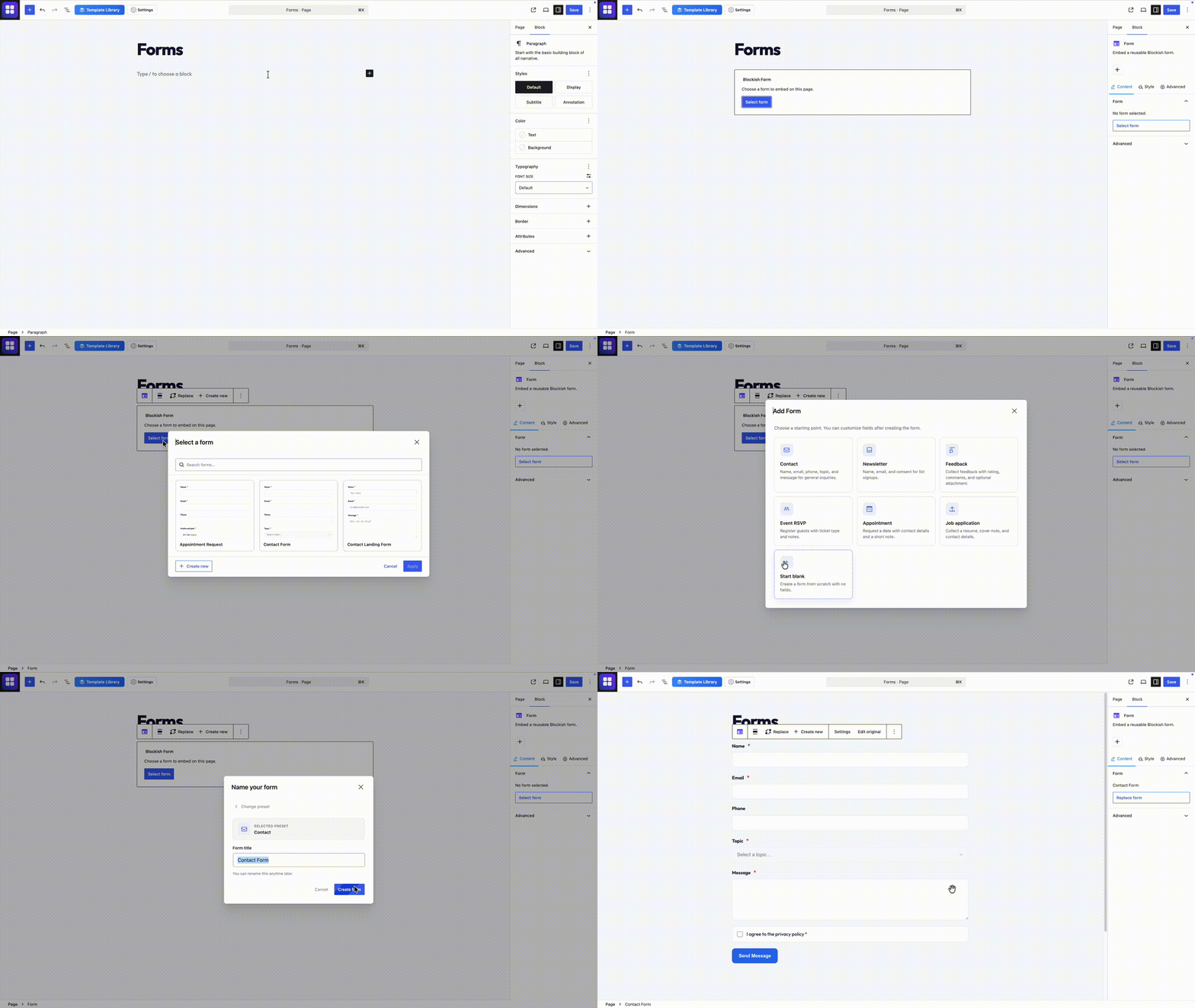
Contact & lead forms
Finish real sites with contact, quote, and signup forms — built in Blockish, filled on the front end, saved in WordPress.
Your AI can place the form; you can edit fields anytime. Spam protection included.
Drag-and-drop form builderSubmissions saved in WordPressHoneypot + reCAPTCHA
Dynamicity
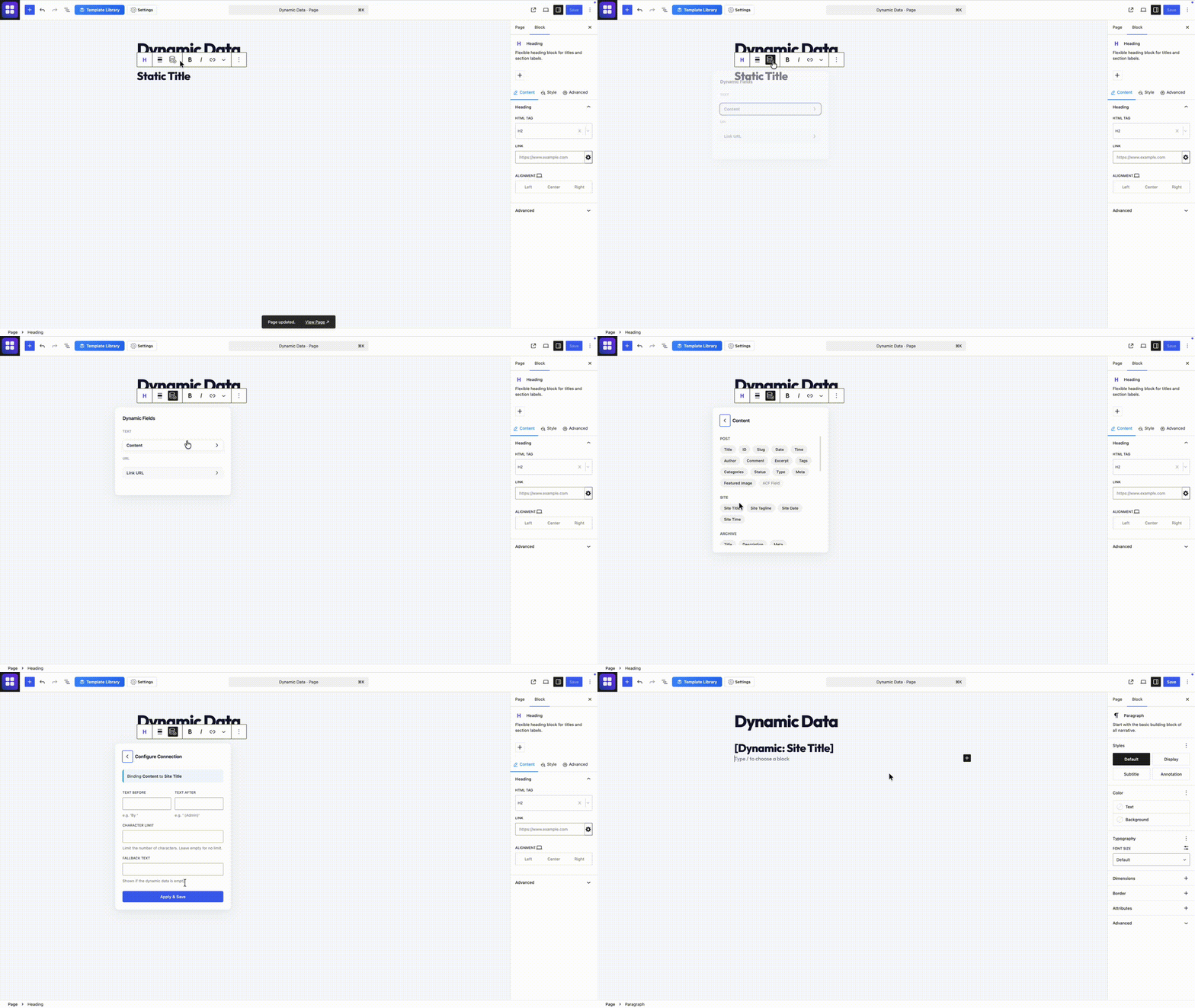
Live content in your design
Hook a heading or image to real site content — post titles, custom fields, and more — without writing PHP.
Your AI can wire it up; you can adjust it in the editor anytime.
Pull titles and fields automaticallyWorks with popular field pluginsSee it while you design
Dynamicity
Who sees what
Hide or show parts of the page based on login, role, date, page type, or link options.
Set simple rules so the right people see the right content — AI or you can create them.
Logged in or logged outDates and link optionsPer-block control
Simple, transparent pricing
Start free. Add Pro Addons only if you need them.
Core is free forever. Pro Addons are optional upgrades — pick what you need, when you need it. Personal = 1 site. Agency = unlimited sites.
Best if you build for yourself — addons cover 1 site.Best for freelancers & teams — addons cover unlimited sites.
Core
Blockish
Free
Forever · WordPress.org
Connect AI + preview & AcceptBlocks + Class ManagerMotion & hide on phone/tablet1-click connect wizardHeaders, footers & full site editing
Pro Addon
Forms
$3.99/mo
or $24.99/yr · lifetime $59.99 · 1 site
Contact & lead forms for real sitesEasy drag-and-drop builderSave submissions in WordPressSpam protection built in1 site license
Pro Addon
Dynamicity
$3.99/mo
or $24.99/yr · lifetime $59.99 · 1 site
Blog grids, shops & dynamic listsVisual Query BuilderLive content from WordPressShow / hide by rules1 site license
Questions, answered
Short answers for the things people ask before they install.
What do I need to get started?
Free Blockish from WordPress.org, a WordPress site, and an AI app you already use (Cursor, Claude, and others). Connect once with the built-in wizard, then start building.
Does anything go live without my approval?
No. Your AI can draft and change the page, but you review it in WordPress and hit Accept when it looks right. You stay in control.
What’s free vs paid?
Core is free forever — connect AI, blocks, Class Manager, motion, and the connect wizard. Forms and Dynamicity are optional Pro Addons when you need contact forms or dynamic lists, shops, and show/hide rules.
Forms or Dynamicity — which do I need?
Forms = contact and lead forms. Dynamicity = blog grids, product lists, live content, and who-sees-what rules. Pick one, both, or neither — Core still works alone.
Where does my site data live?
On your WordPress site. Blockish helps your AI work in the real editor. Your content stays with you — no lock-in page builder.
Can I still edit by hand?
Yes. Everything is normal Gutenberg blocks. You or the AI can change anything anytime — same page, same editor.
Free on WordPress.org
AI builds the page. You say when it’s done.
Same Gutenberg editor. Your AI does the heavy lifting. You decide what ships.
01 Install
02 Connect AI
03 Accept
Pro Addons · forms & dynamic content when you need them